The quick lazy brown dog jumps over the foxes ?

Written by cafealpha no comments
The quick lazy brown dog jumps over the foxes ?
The brown fox quick lazy jump jumps over the ?
The ... well, I forgot what it was, but just to say that I spent a some time in messing with fonts in my Save Data Manager application
In fact, it would be more accurate to speak about code pages (*), because I finally added support for Japanese text display :]

(*) For those who forgot what code pages was :
Once upon a time, before Unicode unified every characters, (and also made strlen function not working correctly on UTF-8 text), there was a custom for all countries in the developed world to define up to 128 extra characters that would be used in second half of ASCII character table.
Of course, Japan wanted to do the same, so it added poor looking "1 byte kana" characters on this extra 128 character page, and also added the remaining characters (including kanjis) after that, which gave birth to Shift-JIS encoding.

Since Saturn was developed, during this prehistoric "codepage" era, it is normal to find can find some code page remnants in Saturn software

One of these "code page remnants" is the comment string stored in each Saturn saves : didn't you noticed that sometimes BIOS displays Japanese characters in its save management screen ?

So, Save Data Manager must display Japanese characters instead of garbage characters when showing comment in save data selection menu !

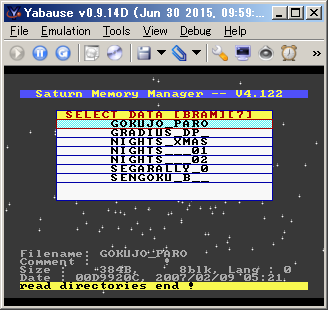
data/images/20150704_save_delete_menu.png
What save comment looked like before
adding Japanese characters display ...
(It's a 6 months old screenshot)

How to do this ?
First, I need to verify that BIOS was defining characters according to Shift-JIS charset, and the best way to do this was to modify some save states and see what BIOS is displaying on screen.

And if possible, displaying as much as possible characters at once would improve the job's efficiency, so I choose to modify Keio Flying Squadron saves since they take only 32 bytes each.

So here comes the reason I choose a such weird title for this article : I wanted to display all font characters at once on screen
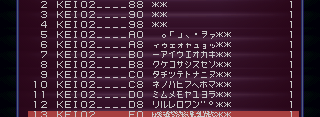
In the facts, I didn't used such a complex "lazy brown dog jump blah blah blah" sentence. I just displayed all the character in ascending order, and here is what it looked like in BIOS screen :

data/images/20160203_chars_katakana_raw.png
Repeat after me : -アイウエオカキクケコサシスセソ...
Looks good  That's definitely 1 byte kana characters in typical order.

Saturn BIOS also has ability to display European (accented) character, and switching from a codepage to another is just the matter of changing a byte per save data, so let's try and see what it looks likes :
data/images/20160203_chars_francais_raw.png
Same text as above, I just changed the language value

Oh, it looks like the good old ISO 8859-1 (latin1) charset

The picture above was displayed by setting French (my native language) language code in save, and setting to another language code (I tried with Spanish) gave unsurprisingly the same results.

So in the Saturn world, one byte equals one character, and there are two codepages to handle in order to display save comment string.
I first feared I had to deal with multi-byte characters (that is a real pain to handle when coding software), but that's not the case, and in fact it's relatively easy to do.

(2 hours later)
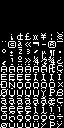
data/images/20160203_font_katakana.png data/images/20160203_font_francais.png
Katakana and European fonts

Hmm, theses characters are looking cute :)
It's seems that it is time to feed my image conversion tool ^^

(5 minutes later)
Okay, latin.bin and katakana.bin files are ready, I should add some codepage stuff in my text display code now !

(1 hour later)
data/images/20160203_font_test3_katakana_text_and_menu.png
Finally some exotic language displayed !
I lost 30 minutes in wondering why application wasn't
initially showing Japanese characters ... and it appears that
I was "cleaning up" the comment string by replacing exotic
character into space character
"It wasn't a bug, it was a feature "

It made sense when Japanese character wasn't displayed
correctly, but it was time to remove this string cleanup code.


Job complete ? Well, there are still some details to fix, and this is what take the most of time when developing software, but at least the boring part of the job is done :]


As a reward for me, I can now set save comment to a cool one when importing save data and that comment isn't defined.
I initially used a dummy "ImportData" string, but the holy "セガサターン,シロ" string defined in hitomi2500's ss-save-parser project is definitely better.
data/images/20160203_save_default_comment.png
セガサターン,シロ !


Last but not least : finishing this main quest opens doors to firmware translation side quest !
Well, Japanese translation would be ugly, because kanji characters are not available (just old-looking katakana characters : this article title would look like ザレージフォックスジャンプオーバーザブラウンドッグ on firmware :D), and on software side, handling multi byte characters is a real mess, so I don't want to do make a Japanese version of Pseudo Saturn Kai and Save Game Manager.

However, translation for European languages is now technically possible
Well, "possible" doesn't means I will do this right now  This is a low priority job, so I will do it when I will have enough time and motivation for it.

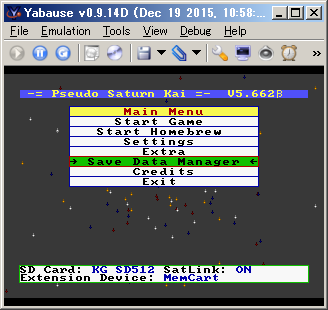
BTW, in order to test if exotic character display was OK on Pseudo Saturn, I tried to print "beta" glyph (defined in European codepage) on the title bar :
data/images/20160211_pskai_main_menu.png
Pseudo Saturn Kai main menu
Without any surprises (text display routines are common between Pseudo Saturn Kai and Save Data Manager), it works !
I can finally indicate that this is a beta version ^^


Edit : oops, the feature to inform me when a comment is posted seems (once again) not to work, and consequently I didn't noticed new comments :/

Here are the comments I replied so far. Since I'm late, they deserve to be re-posted here :

I am really happy to hear that you don't have cancer anymore!! Congratulations! I wish you a really long and happy life! :)     Anon

@Anon : It doesn't guarantee I'm cancer free !
CT scans indicate that there is no evidence of cancer relapse, but CT scan has limits (it doesn't shows millimeter-order tumors), so I continue regular cancer screening and taking care in everyday life

--------------
Hey @Spawn, could you upload those Saturn saves you have on your PC?
I have been looking for an archive of Saturn game saves for months now and I haven't found any.
Maybe with the save states I have, and your saves I can upload them somewhere and start an archive? I'll give you credit for it of course.     ReyVGM
@ReyVGM : Thank you for sharing your saves on segaxtreme !
They will be available for everybody on Save Data Manager, so that it will be easy to import on Saturn or emulator.

--------------
best wishes for 2016 !!!     vbt
@vbt : Thank you ! Best wishes for 2016 too !!!
Well, we are already in February, sorry ^^;


--------------
It's great to see your active development, cause my saturn projects are almost in hibernation today (i'm a bit in a time trouble). And i'm glad my code is of some use.
Good luck!     hitomi2500
@hitomi2500 : Hehe, I got some free time until end of March ... I don't know what it will be after that, but what's sure is that I will continue to have fun with my Saturn  Please keep continuing the good work too :]

--------------

stunned and confused

last night I went on a sega saturn nostalgia trip.

I had to catch up with 8+ years @ segaxtreme.
I found antime's usbcart, hitomi2500's fork, hitomi2500's new "wasca" and your stuff here.

sounds great ...
I need to dig up my saturn and finally start something.
I have a usb-cart from 2006 from pinchy (he seems inactive since 2007).     seal1
@seal1 : Hey, I remember seeing your nick in segaxtreme thread about yano/Freewing transfer device (I built a Freewing device at that time).
It was a long time before I made my first USB dev cart ... nostalgia.
Many members forgot about Saturn and left segaxtreme, but luckily vbt and antime are still active.
You're always welcome on segaxtreme, even if it just to say "hi"

Read more The quick lazy brown dog jumps over the foxes ?

WIP : Saturn Save Data Manager, Pseudo Saturn Kai & USB dev cart, etc

Written by cafealpha 6 comments
Pseudo Saturn Kai  firmware development is currently paused in order to focus development into Save Data Manager application

Saturn Save Data Manager is an application in order to manage (copy, delete, etc) save data on your Saturn.
Basically, it is similar to the save data manager provided by Saturn BIOS, but also offers extra things, such as multiple selection of items to copy/delete, GPL license, and also save data import from various formats.

data/images/20160125_bupmngr_main_screen.tb.png
Saturn Save Data Manager main screen running on emulator.
It also works on real hardware, but I was too lazy
 to take a picture of my TV screen


At first, this Save Data Manager was made only in order to test Virtual Memory Cart behavior, so maybe user interface looks a little cheap, but I plan to improve this in the future according to first users eventual feedback


I really want to thank two people whose work helped to make this application :
 - Rockin-B : for his good old SaveGameManager application (yes, I copied the name of the application).
 - hitomi2500 : for his ss-save-parser application that really helped to understand Saturn Save Data structure. Also, I merged its Save Import related sources to my project, so that copying save data from dump file is possible directly on Saturn too


And, there's one screen that I need to show from ss-save-parser application : the "extract options screen". This is image is worth a thousand words when trying to explain how save data is arranged in Saturn backup RAM

data/images/20160125_save_data_structure.png
THE screen everyone need to see before
hacking Saturn saves data
Save data is arranged as header
(containing save name, comment, etc),
then blocks allocation table,
then data itself, with header data at
the beginning of each blocks.


Extra #1 : last month, I took a video of USB dev cart in action !
Nothing really spectacular however, but please watch it if you want to see what developing application with USB dev cart looks like
data/images/20151217_usb_dev_cart_demo.jpg
My dev laptop, a plain, not modded Saturn and USB dev cart,
ready for testing Saturn application on real hardware


Summary of the video (more details available in youtube page of the video) :
 - USB dev cart firmware update
 - CD-ROM unlock by using Pseudo Saturn hack
 - Upload and execution of program from PC to Saturn via USB, allowing testing of application performing CD-ROM access.


Extra #2 : with this USB dev cart, I could dump Shining Force Scenario 1 saves from Gosub .
You can find theses saves here.
data/images/20160112_gosub_sf3sc1_t.jpg
Backup cartridge with gosub's saves on it.
Thanks to Darius for providing me the cartridge

Gosub pushed each Shining Force character to their maximum competence on real hardware without using any cheat.
Really impressing work oO


Extra #3 : last month, my car reached its life achievement : 777777 kilometers :]
data/images/20160120_lucky_seven.tb.jpg
Wow. Many lucky seven. So beauty
Next challenge : 777 777 kilometers !


Read more WIP : Saturn Save Data Manager, Pseudo Saturn Kai & USB dev cart, etc

USB dev cart & SD card interface on a single cartridge

Written by cafealpha 1 comment
Classified in : Saturn, Programming, Mylife Tags : usb dev cart, kai, WIP
Last week, I populated the second "USB & SD card" dev cart ever

data/images/20160112_usb_sdcart.tb.jpg
USB & SD dev cart Rev 3.2

Why "second" ? Because the first "USB & SD card" dev cart I made is the one I'm currently using for dev :
data/images/20150716_memcart_rev2f.tb.jpg
USB & SD dev cart Rev 2f

PCB revision is different ... can you spot the differences ?

It can't be seen on the picture, but Rev 2f have a 128KB SRAM chip soldered on its rear side.
I actually don't use it, this is just a remain of the times I though extra RAM was required in order to get "SD Memory Cart" features to work.
After many tests, I could verify that it was not needed : SH-2 code for "SD Memory Cart" feature runs directly from Flash ROM, and 16KB+8KB of work RAM provided by games for Backup library is enough for my needs.
So I removed the routing for this SRAM chip on Rev 3.2 PCB

Another story, but about Rev 3.2 cartridge pictured in this article : I was about to trash it because I couldn't flash its CPLD firmware, and hence thought it was broken.
I first though that CPLD itself was broken (this may rarely happen when overheating it during soldering), so I removed it and soldered another CPLD, and ... same behavior
CPLD itself is detected by Quartus, but flash always fails at 98% of the flashing process. I (finally ) start to think it may be a power supply related problem, and ... bingo : CPLD wasn't 3.3V as expected.
In fact, this board features two 5V -> 3.3V power converter units (on PCB rear side, can't be seen on the picture above), a "spare" one not connected anywhere (just here in case of), and the "real" one, and I populated the "spare" one
In order to fix this, I didn't populated the "real" one, but instead connected the spare one to SD card and CPLD power supply line, and that's why there is a grey wire nearly USB connector


Final note : as I consider USB port for debug only, I don't plan to improve the architecture and routing of such "USB & SD dev cart", so I suppose its design will remain "messy and fat" for a while ...
But in the hypothetical case many talented developers will suddenly arrive in Saturn Homebrew scene and will want to develop games using both CD ROM for music and SD card for huge game data (yeah, I really want a Saturn game with gameplay/level/whatever data so large that it can't fit a CD-ROM !), I will re-design it in order everything fit in a standard cartridge shell

Read more USB dev cart & SD card interface on a single cartridge

Happy New Year !

Written by cafealpha no comments
Classified in : PPCenter, etc, Mylife Tags : vacation
First post in 2016 Happy new year !!!

Last week was "new year's bargain" here in Japan.
So, no, I didn't spent my whole day in choosing clothes
Instead, I went to electronics store, and bough a 128GB SD card for only 5000 Yens (around 40 US dollars)

I use this SD card in order to watch movies on my Pandora during lunch time

data/images/20160110_pandora.tb.jpg
Pandora : Youtube, Firefox, Thunderbird, mplayer,
and real keyboard in my pocket


Read more Happy New Year !

Merry New Year !

Written by cafealpha 6 comments
Classified in : PPCenter, Saturn, Mylife Tags : Christmas, Saturn, kai, beta, development, testing
I sometimes check this blog in order to verify if there are some interesting news, without success, and then I realized that I am the only author of this blog (), hence though I should write something here in order not to deceive my countless fans.

So, sorry for the lack of news recently, I was busy with Saturn things, but also in deciphering Christmas presents lists ... and now busy in tidying up lego blocks and trashing used wrapping paper

I hope you're spending nice Christmas vacations ! I'm a little late for wishing you a merry Christmas ( ), and a little early to wish you an Happy New Year ( ), hence the broken title


So what's new with my Saturn projects ? In fact, nothing worth writing an article, but here is a short (and probably incomplete) list anyway :

 1. SD Memory Cart : when overwriting save on Saturn side, keep the old save file on SD card (but remove it from saves list, of course).
Basically, it automatically keeps old saves somewhere on SD card, so that it is possible to revert to a previous state. I hope Saturn RPG fans will like

 2. USB dev cart mode : when USB cable is detected, allow to unlock CD-ROM and then prompt for data upload.
This feature allows to makes tests on Saturn main program using data from CD-ROM without the need of installing a modchip, and without the need of burning a CD-R on each program changes
Special thanks to Shazz for reminding me to add such a feature, antime for wiring FTDI's PWREN signal to Saturn (it was unused for 3 years, but it was useful in order to detect USB connection, and hence hiding USB dev mode for normal users not using USB), and of course CyberWarriorX and jhl for Pseudo Saturn

 3. PCB changes : basically removing few debug "in case of" stuff, and also moving SD card socket in order to fit better with cartridge shell.
It is still WIP, but plan to send the updated gerber to the PCB house on next month.

 4. Few changes to the sources of yabause I'm using for testing my projects.
Especially, I added position save/restore and keyboard shortcut to each debug dialogs ... long time I wanted to do this

 5. In Backup Data Manager, some additions to "Import" feature : backup data dump file read and parse was done a while (4-5 months ?) ago, I just added something to select where (Internal Memory or Cartridge or Floppy) to save selected saves, and plan to port save data extract algorithm next month or so
Thanks to hitomi2500's ss-save-parser project, such "Import" feature is easy to integrate in my Backup Data Manager project


Last but not least, I also want to thank Stac user on Assembler forums
He's doing good job in beta testing, and thanks to his reactivity and good communication, project is progressing faster than I was expecting.
Beta testing is far from being a funny job, especially with me as main programmer (), and when testing requires to play games (this requires time, and bugs on my Saturn project may lead to loose of progress in game), so once more, thank you 

Read more Merry New Year !

Rss feed of the articles