Pseudo Saturn Kai Release Candidate 1 : flasher utility wasn't very intuitive to use → fixed.
Release Candidate 2 seems to work fine, so ...
I officially declare Pseudo Saturn Kai version 6.036 as first publicly released version 
Want to upgrade your cartridge firmware ?
No problem, firmware installer, source code, and many other things are available from /pskai/#download address 
Many thanks to beta testers who could make this project mature enough to be releasable 
And of course, many thanks to Pseudo Saturn team too
Note : this doesn't means that Pseudo Saturn Kai is bug-free !
But, I consider that Pseudo Saturn Kai is stable enough to open it to circle wider than beta testers. If you find a bug, please report it in Pseudo Saturn Kai official thread .
On my side, releasing Pseudo Saturn Kai was the occasion to :
- Release Gamer's Cartridge (page is still not up-to-date, I shall update it soon)
- Delete beta builds for testers : here is the delete log as a souvenir :
Response: 250 Deleted Planche_20160514.png
Response: 250 Deleted Planche_20160514.pdf
Response: 250 Deleted pskai_20160426_wip.7z
Response: 250 Deleted pskai_20160424_wip.7z
Response: 250 Deleted pskai_20160421_wip_6028.7z
Response: 250 Deleted pskai_20160416_custom_logo.7z
Response: 250 Deleted pskai_20160415_wip.7z
Response: 250 Deleted pskai_20160414_wip_6025.7z
Response: 250 Deleted pskai_20160414_wip_6022.7z
Response: 250 Deleted pskai_20160412_wip_6019.7z
Response: 250 Deleted pskai_20160412_sakura_wars_deza2.7z
Response: 250 Deleted pskai_20160411_sakura_wars.7z
Response: 250 Deleted pskai_20160410_wip.7z
Response: 250 Deleted 20160409_jhl_cd_hack.7z
Response: 250 Deleted pskai_20160408_ubc_test_v2.7z
Response: 250 Deleted pskai_20160408_ubc_test.7z
Response: 250 Deleted pskai_20160408_sdm_flasher.7z
Response: 250 Deleted pskai_20160406_ubc_debug.7z
Response: 250 Deleted pskai_20160404_vmem_test.7z
Response: 250 Deleted pskai_20160403_wip.7z
Response: 250 Deleted pskai_20160402_jhl_cd_hack-v2.7z
Response: 250 Deleted pskai_20160331_jhl_cd_hack.7z
Response: 250 Deleted pskai_20160331_O3.7z
Response: 250 Deleted pskai_20160329_compat_vmem_test.7z
Response: 250 Deleted pskai_20160328_wip.7z
Response: 250 Deleted pskai_20160326_wip_saves.7z
Response: 250 Deleted pskai_20160324_ftx.7z
Response: 250 Deleted pskai_20160324_ftx_flasher.7z
Response: 250 Deleted pskai_20160323_linktest.7z
Response: 250 Deleted pskai_20160320_flasher_ftx.7z
Response: 250 Deleted pskai_20160318_satlink.7z
Response: 250 Deleted pskai_20160311_ftx_sdm.7z
Response: 250 Deleted SMPSCL5_20160311.7z
Response: 250 Deleted flasher_arp_20151005_tp.7z
Response: 250 Deleted 20160308_pskai_wip_flasher.7z
Response: 250 Deleted 20160308_pskai_wip.7z
Response: 250 Deleted 20160306_pskai_savemanager_flasher.7z
Response: 250 Deleted 20160305_FlashSave000.7z
Response: 250 Deleted 20160228_pskai_savemanager_flasher.7z
Response: 250 Deleted 20160226_pskai_flasher.7z
Response: 250 Deleted 20160226_pskai_lowram.7z
Response: 250 Deleted 20160223_pskai_wip.7z
Response: 250 Deleted 20160222_pskai_latest.7z
Response: 250 Deleted 20160222_pskai_5.776.7z
Response: 250 Deleted 20160216_pskai_loader_fix.7z
Response: 250 Deleted 20160216_pskai_test.7z
Response: 250 Deleted 20160215_pskai_wip.7z
Response: 250 Deleted 20160214_pskai_wip_jhl_cd_hack_test.7z
Response: 250 Deleted 20160214_pskai_wip.7z
Response: 250 Deleted 20160210_pskai_wip_saves.7z
Response: 250 Deleted 20151230_pskai_wip_saves.7z
Response: 250 Deleted 20160209_ReyVGM_test2.7z
Response: 250 Deleted 20160209_ReyVGM.7z
Response: 250 Deleted 20160205_ReyVGM.7z
Response: 250 Deleted 20160204_ReyVGM.7z
Response: 250 Deleted 20160203_ReyVGM_test.7z
Response: 250 Deleted 20160202_ReyVGM_test.7z
Response: 250 Deleted 20160129_commslink_saves.7z
Response: 250 Deleted 20160127_pskai_shazz.7z
Response: 250 Deleted 20160129_vfk_test.7z
Response: 250 Deleted 20160126_bkram_planetweb.7z
Response: 250 Deleted 20160125_bkram_test.7z
Response: 250 Deleted 20160124_bkram_test.7z
Response: 250 Deleted 20160112_sonicr_save_test.7z
Response: 250 Deleted 20151230_pskai_hybrid_device.7z
Response: 250 Deleted 20151223_pskai_v2.7z
Response: 250 Deleted 20151223_pskai.7z
Response: 250 Deleted 20151219_pskai_bootstub.7z
Response: 250 Deleted 20151218_flasher_src.7z
Response: 250 Deleted 20151218_pskai_wip.7z
Response: 250 Deleted 20151214_pskai_rmenu_dbg.7z
Response: 250 Deleted 20151110_pskai_spi_fix.7z
Response: 250 Deleted 20151002_pskai_selftest.7z
Response: 250 Deleted 20151031_pskai_scu_test.7z
Response: 250 Deleted 20151030_pskai_sd_card_debug.7z
Response: 250 Deleted 20151028_pskai_fat_io_lib.7z
Completely unrelated : I'm experiencing troubles with my email provider (*1), and consequently plan to change to another one soon.
(*1) : mail provider is sometimes messing up with email titles, such as
using neighboring (unrelated) conversation title when sending email ...
 Y U NO MAIL ?
If you're waiting for one week or more for a reply from me, please re-contact me
Email timeout value is "one week" : I'm not a machine, so please don't mailbomb me if I can't reply you soon 
Read more RC2 - The good one
Good and bad news for people interested in my cartridge .
The good news is that cartridge (Saturn Gamer's cartridge) and its firmware (Pseudo Saturn Kai) are more or less ready for release
After release, project sources (PCB design files, and Pseudo Saturn Kai source code) will be publicly available, and few carts (not a lot) will be available for sale.
The bad news is that there are still few thing I would like to improve before release.
Among theses things I would like to improve, there is a custom label for cartridge case : I'm currently using second hand Action Replay cases for my project, and really don't like Action Replay label.
In fact, I removed theses ugly labels ... it was hard to do (I don't know why they're using glue so strong !), but I really couldn't stand theses out-fashioned labels 
Rather than designing label by myself, it's probably better to ask everybody about their favorite design for Gamer's cartridge label !
In fact, as labels will be printed by batch of 12 per page, it's OK to print different labels at once, then, let future user choosing his favorite label when ordering cartridge :)
Rules :
1. Width : 946 pixels, Height : 592 pixels.
Adding some margin around your label is encouraged.
Of course, larger images are accepted, but please respect image ratio, and please keep in mind that it will be resized to 946x592 when adding text or small details.
2. Image format supported on my PC : PNG or JPG.
(Please ask if you prefer other format.)
3. Display following cartridge description text in English :
Saturn Gamer's cartridge
http://ppcenter.free.fr/satcart/#gamers
✔ Plays CD-R game backups. (※)
✔ Memory Cartridge. (※)
× Cartridge RAM.
× Play games from SD card.
(※) Some games may be incompatible.
4. Copyrighted images usage forbidden.
5. Deadline : a couple of weeks (= middle of May 2016).
6. You allow me to re-use your label in this and future projects.
Tips :
- If possible, please use plain color (black, white, or anything else) for label outline : as labels will be hand-cutted, I plan to add some margin around label itself, in order to avoid defect due to bad cut. (2017/03/12: my friend Darius does good job regarding label cutting, so the outline is not required )
- It's OK to add some non-English text, but in this case, you need to display cartridge description text in English, as described in rule 3.
- (Added 2017/03/12) Please use relatively large font for text on the label so that it can be readable after printing. At 946x592 dimensions, recommended text height is over 25 pixels. This obviously depends on font used, contrast with neighboring background, etc.
- (Added 2017/03/12) It's OK to remove the "× Cartridge RAM." and "× Play games from SD card." messages if theses doesn't fits in the label.
Reward :
- Your name in Pseudo Saturn Kai firmware credits 
How to submit :
Please submit your label here in the comment of this article, or directly by contacting me.
In both cases, file can't be uploaded, so please provide your label(s) via external host site (imgur, sendspace, or anything else).
You can also submit your label to Pseudo Saturn Kai official thread on segaxtreme forums.
Notes :
- I may reject dull/offendant/whatever label(s).
- Cartridge case will be available in both black or white colors, and black will be the most available color.
- Custom label for USB dev cart is welcome too.
Want to make your own label ? Great :)
And want some stuff to start from ? No problem, you can find some cartridge pictures below :
Cow logo, used in cartridge PCB :
- vache.gif : initial image from which everything started.
- vache0.bmp : first version of vache logo (silkscreen only, bottom of the PCB).
- logo_vache.png : latest version of vache logo (silkscreen, solder mask, top right of the PCB).
- vache_06_2_2+cornes2_-_finale.png : pixel art image used to make logo_vache.png.
Pictures of cartridge PCBs :
- 20140314_rev2a_front.jpg : Rev 2a cartridge : Gamer's cartridge ancestor, nothing worked.
- 20140918_vmem_first_ver_sat.jpg : First time Virtual Memory Cart worked on real hardware : PCB and dev Saturn used at that time.
- 20140918_vmem_first_ver_tv.jpg : First time Virtual Memory Cart worked on real hardware : debug stuff displayed on sreen.
- 20150628_rev2f_front.jpg : My Rev 2f cartridge used to debug Pseudo Saturn Kai.
- 20150718_memcart.png : Rev 3.1 cartridge preview, last step before ordering it to PCB house.
- 20160119_logo1.jpg : Cow logo, from vache0.bmp.
- 20160119_logo2.jpg : Cow logo, logo_vache.png (available in Rev 3.3 and Rev 3.3a PCB only).
- 20160126_rev33_front.jpg : Rev 3.3 PCB, front side.
- 20160224_rev33_raw.jpg : Rev 3.3 PCB, ICs except SD card socket unsoldered.
- 20160305_rev33a_front.jpg : Rev 3.3a PCB, front side.
- 20160315_rev31_back.jpg : Rev 3.1 PCB, rear side.
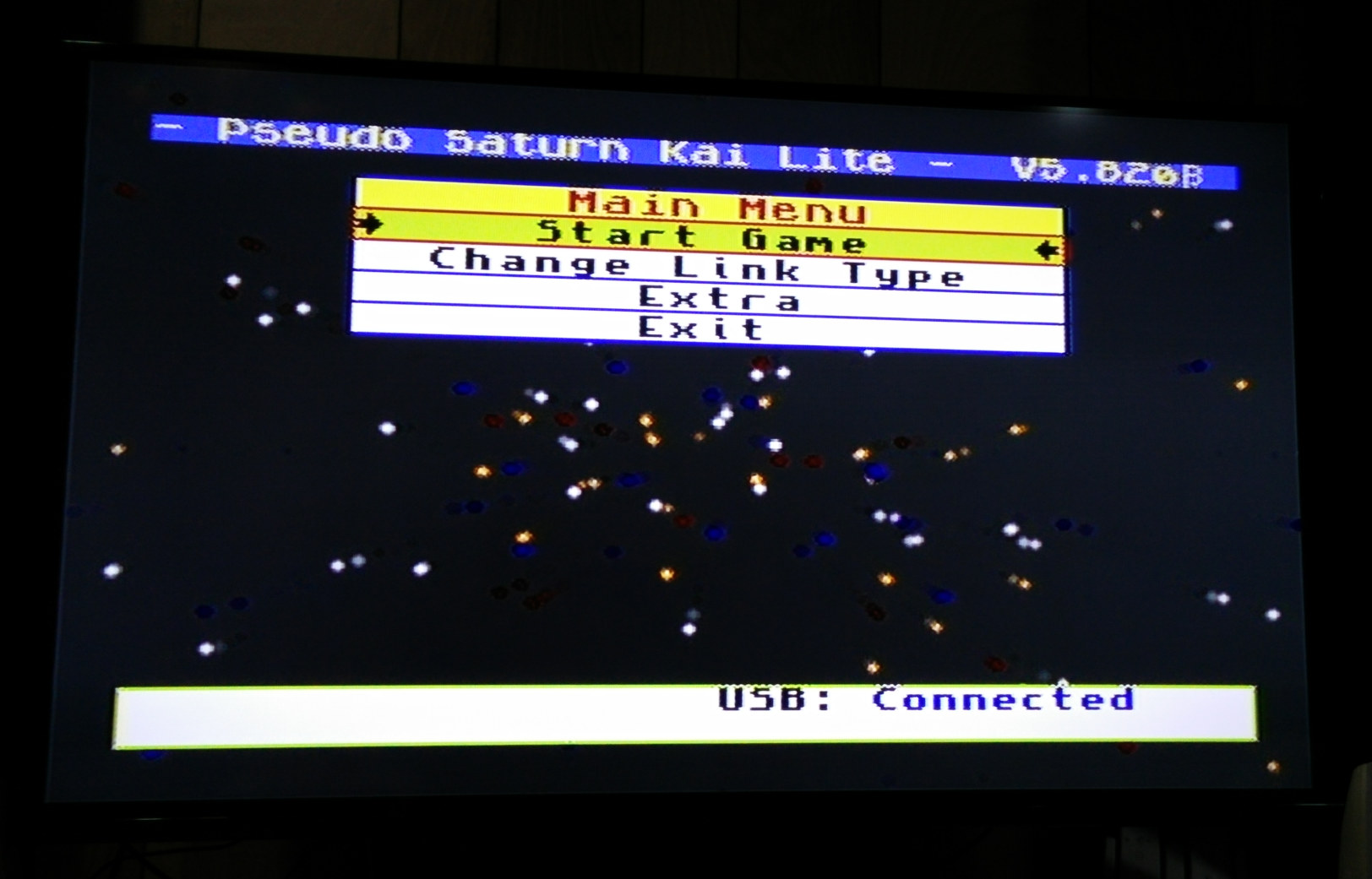
- 20160318_pskai_main_screen.jpg : Pseudo Saturn Kai main screen.
- 20160324_rev32_rear.jpg : Rev 3.2 cartridge rear side.
Images related to USB dev cart :
- 20120709_usb_dev_cart_logo.jpg : My favorite logo for USB dev cart
- 20160308_routing_printout.jpg : very old (Rev 1c proto ?) routing printout.
Not interested in designing a cartridge label, but interested in Saturn cartridge ?
No problem, the Saturn Homebrew Cartridges's gallery section is waiting for you
 Saturn Homebrew Cartridges gallery
Click on the link if you want to see more
(Added 2017/03/12) : All the images above can be used without restrictions.
Edit : everything is now available
here.
Future contributions are always welcome
Re-edit : here is what it looks like after printing :
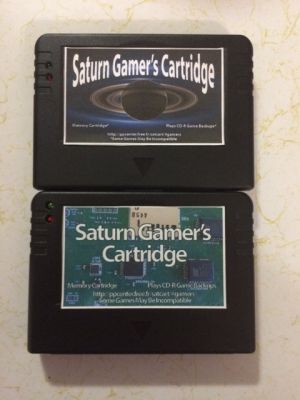
Gamer's Cartridges with labels
Thanks to
jjennings089 for label design and printing
Read more Wanted : custom cartridge label
It's a long time USB dev cart is supported on Pseudo Saturn Kai, but it wasn't tested seriously elsewhere than my development environment.
... Until now
(Well, in fact, it was "until a couple of months ago", because I didn't had time to write this article earlier.)
So, a USB dev cart new user (Shazz) wanted to do some Saturn development : great
 USB dev cart demonstration video (youtube).
I used Shazz's USB dev cart to make this video,
in order to be sure it worked well before sending it to him.
His dev PC runs under Linux ... I personally use Windows only, so I can't guarantee USB dev cart + Pseudo Saturn Kai will work correctly.
"Maybe it will run fine with antime's ftx tool".
"Maybe"
Of course, it didn't worked
My first suggestion was "please use an old PC with Windows installed lol", but Shazz don't like such half-concession, and really wanted his USB dev cart to work directly on his Linux dev PC.
As an USB dev cart manufacturer, I agree with him.
As a programmer already busy with other projects and real life, I disagree ^^
But, Okay, Shazz is actually a cool and chatty guy, and sharing same mother tongue with me, so I will do it for him
The cause of the problem happening when using Linux + USB dev cart with Pseudo Saturn Kai is actually still unclear.
With original USB dev cart firmware (nicknamed as "blinking screen", or sometimes "epileptic screen"), executing a Saturn program with "ftx" utility works fine.
However, with Pseudo Saturn Kai installed, the same operation didn't worked and Pseudo Saturn Kai main screen was freezing (? or continuing doing menu things ? I already forgot about details about this bug It's really time to write it on this blog before I forget it completely ...) instead of switching to uploaded program.
I suspected Pseudo Saturn Kai ignoring two successive commands from USB dev cart ("executing" a program is actually sending an "upload" command, then "execute from specified address" command), especially because Pseudo Saturn Kai can't check for USB I/O continuously : it "just" does it once every frame.
Since I really couldn't understand why this could cause that "upload, then execute" problem, I decided to countermeasure it by adding a new "upload and execute" USB dev cart command.
And on the same occasion, I also added the "à la carte" reset flags in this command : "one stone, two birds", as people in Japan would say ... I suppose that other people would rather say "one USB dev cart command to rule them all" :D
One more problem about this "Linux + USB dev cart + Pseudo Saturn Kai" problem was that I couldn't verify if everything is working fine or not.
Shazz was OK to do some beta testing, but he can only upgrade his USB dev cart via USB link, so "breaking" USB transfer would brick his development cartridge.
Around software development, I experienced enough Murphy's law and its corollaries to be sure it won't work on first try :
- "If it can break, it will break"
- "The less you test, the more likely it will fail on basic pattern"
- "The more you test, the more likely it will fail on unexpected pattern"
So I added Pseudo Saturn Kai "demo" version
As its name suggests, it actually doesn't do anything special else than showing menus, but that's enough in order to test communication with PC.
Additionally, I also displayed some debug messages to screen when doing USB related stuff.
 Pseudo Saturn Kai demo version
showing USB activity logs on screen
First two lines logs USB dev cart firmware version
verification : even if used with old (not Pseudo Saturn Kai)
version of firmware, transfer utility works
After testing many buggy versions of the firmware, Shazz tried the "20160323_test4" test pattern with his "parallax" test program, and ...
 Could upload and execute libyaul example program
from Linux via USB dev cart and Pseudo Saturn Kai !
Thank you Shazz for testing Pseudo Saturn Kai + USB dev cart Linux support !
USB debug port related support is always a hell for me and cartridge users (may not work on a given OS, etc), hence there are no plan to add it in release version of my cartridges.
But even if it requires drivers and custom transfer software on PC side, debug USB connectivity is a must have when developing things on Saturn, so rather than dropping USB debug port, I plan to make a "USB + SD card interface" cartridge for Saturn developers only.
And of course, I still continue to manufacture USB dev cart
Read more Pseudo Saturn Kai development : USB dev cart support
One month from last update, but not significant updates 
The reason is that children fought with nearly all typical winter diseases during the last three weeks : mumps, influenza (x2), gastro enteritis, and finally otitis ... x2 too 
Internet husband ...
I hesitated to put other pictures like "x2 combo !"
and "body temperature over 40 ? High score !"
Children were relatively safe from winter diseases until last month, but last spurt until summer was relatively heavy for them 
So, no significant updates, but various minor updates :]
Among theses updates, main menu display has been improved when lite version of the firmware is used :
- "Extra" features moved to main menu
- System status now displays Saturn related informations (BIOS version and PAL/NTSC frequency information) rather than nothing when USB and SD card aren't detected.
Theses changes concerns USB dev cart and Action Relay users, hence the majority of Pseudo Saturn Kai future users, so theses changes couldn't be avoided before initial release
Here are pictures taken before and after the changes.
Many thanks to Zone66x for testing and taking theses pictures
Pseudo Saturn Kai v5.820 : status display was a little "empty"
And USB port was incorrectly detected when running from Action Replay ...
Pseudo Saturn Kai v5.875 : some saturn informations are now displayed.
There's no simple way to detect if cartridge is Action Replay or not,
so generic "Boot Cart" string is displayed when cartridge type is unknown.
And main menu is a little simpler :
no longer need to go to sub menu in order to access extra features.
Also, Zone66x verified that Action Replay communication port (parallel-like port) was usable with Pseudo Saturn Kai. Thank you for testing
Another new feature I'm proud enough to introduce it on my blog is the soft reset "à la carte" 
Soft reset is used in Pseudo Saturn Kai when loading game from CD-ROM, and also when executing program received from USB port.
Basically, it wipes all memory, and puts VDPs memory and registers in initial state, which is good when loading game from CD-ROM, but causes problem when Saturn developer wants to do something else than "just" executing program on main RAM.
The "à la carte" advantage comes here : it is possible to select which module to soft-reset, and which one to let as-is before executing program.
Here is an example :
Pseudo Saturn Kai (lite version installed on USB dev cart) main screen.
Test program will be executed from this screen.
Let's try to let VDP registers and VDP1 RAM as-is when uploading test program :
Soft reset "à la carte" settings and execution result :
Starfield (VDP1) remains in memory and is displayed on test program.
One more try, but with VDP1 RAM clear before execution :
Soft reset "à la carte" settings and execution result :
As VDP1 RAM is cleared, starfield is no longer displayed.
Possibilities for this features are relatively wide : it's for example possible to upload graphics on VRAM, then level data on sub RAM, then execute test program on RAM.
I hope this will help to improve Saturn homebrew development scene :)
Read more Pseudo Saturn Kai lite firmware fixes and improvements