Today was a nostalgia day : I uploaded program to my good old TI-89 via "$4 parallel link cable" I made around 15 years ago, when I was high school student 
 My TI-89 and its "$4 parallel cable", still working
First, I wanted to use my 7 years old desktop PC with parallel printer port available ... but it stopped to work after 2 minutes of usage. However heavy washing of CPU fan (yeah, "washing" : I put it in the water, then used my hair dryer to dry it) solved this 
I then tried to install TILP program, but I was lost in installing GTK ( ), and link related DLLs ... a real nightmare, and it didn't worked too ... (Sorry Lionel and other TILP authors ! Your soft is great, but its installer is a real piece of crap)
So I tried even older W32Tran8x, a program made under Win9x era.
Except DlPortIo that needed to be updated to work under Windows7, everything worked fine !!!
The simpler the better 

I will try to keep this way of thinking when creating Saturn programs or cartridges
Edit : I successfully installed GTC, an oncalc C compiler. Thank you Pollux (GTC author) for your great work
It's funny to program on a machine where sizeof(int) equals 2.
Read more Long time without using my TI89
I'm about to gather parts in order to make new USB dev cart !
I hope to have some free time at the end of the month to assemble few ones, so please let me know in the comments or by email if you want to preorder one unit
Only very few SST39SF040 flash chips were available for sale from IC supplier, so I bought SST39SF020 instead. On Saturn side, this change makes flash memory dropping from 1MB to 512KB, but USB dev cart itself uses only few tens of KB to work, so everything is fine
First, I will assemble my personal USB dev cart, because I sold it few months ago ... I can't wait to finally be able to debug software on my Saturn
Edit (2015/03/10) : My personal cartridge (until I sell it ) is ready and tested !
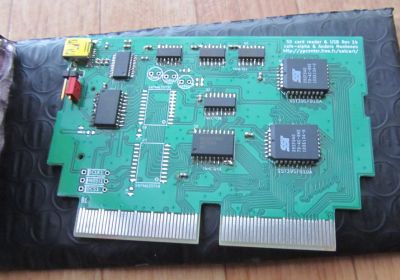
The PCB is a old version, hence some ICs are unused and unsoldered. Latest PCB version has a cleaner design

Two more cartridges are waiting for flashing and testing before selling. I plan to do this on next week.
Read more USB dev cart for sale soon
During a while (one month or so), it wasn't possible to access page to post comment, but this is fixed now.
Sorry for the trouble caused, and thanks a lot to people in PluXml support forums
Read more Comments feature restored !
So I'm currently making a Saturn Backup Data Manager utility.
What's this ? It is a remake of "Memory Manager" utility present in Saturn BIOS.
Sega Memory Manager utility : main screen
It already exists, and can be used from BIOS, so why making such an utility ?
I have some reasons that pushed me making this, and one of theses is that Memory Manager user interface is very cheap, especially, it doesn't allows to select multiple backup data and copy/delete them. (Dear Sega, why didn't you developed this feature ??)
Also, there are some new features I would like to add, such as hex-edit of memory data ... I have very few time to play now (real life, children, cancer, etc), so 999 lives in Backup data is a must-have feature
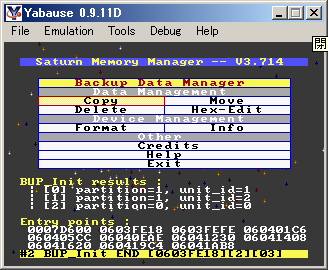
This utility is currently WIP, so no download link is available right now, but it is WIP enough to publish screens on my blog
So here is what it looks like now :
Backup Data Manager Main Screen
Don't trust the development progress only by looking at the main menu : everything behind is far for being finished
But at least, menu library itself is more or less completed, and I'm very glad about this point.
Here is a comparison of data selection screens :
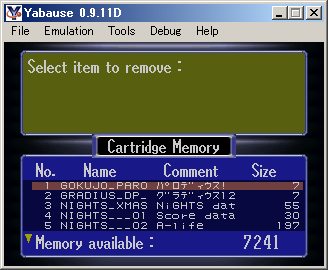 Data Selection (Sega)
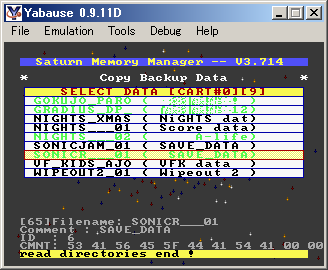 Data Selection (this utility)
Yeah, I know that Japanese text is not displaying properly ... this will be fixed, but the priority for this is low, so please be patient.
And what is the green text display on Backup Data Manager screen ? This is multiple items selection
As a bonus, here are screens of Backup Manager running on real hardware.
Pictures were taken last September, when I still had a modchipped Saturn ready for use ... after that I was busy with medical stuff, and moving to a new apartment, so my Saturn I used for testing is currently hidden in a cardboard ...
 Early version of Backup Manager, picture was taken 4 months ago.
Can you spot the differences with current version ? ^^
SatLink running on my 8 years old laptop, connected to my Saturn via USB dev cart.
This development environment is by faaar more convenient than $500+ vintage
development hardware/carts/whatever floating on ebay ♪
Among the things I would like to add before a release, there is the Saturn FDD support ... but I don't own Saturn FDD unit, and the cheapest unit I could find on auction sites costs 10'000 Yens, and the seller doesn't guarantee that it still works ...
I won't pay 10K Yens for a vintage objet I will only use once a year (and I fear my wife would trash it if she founds it  ), so if somebody is ready to give some time for beta testing with Saturn Floppy Disk Drive, please let me know in the comments
Read more Backup Manager - Early Version #1
Long time no see, but finally back on internet :]
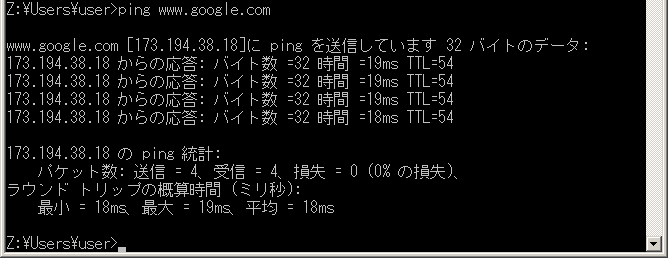
First ping test ^^
Many mails to check, many new things to read ... will do this later ^^;
Read more Back to internet !